1The weekend that started it
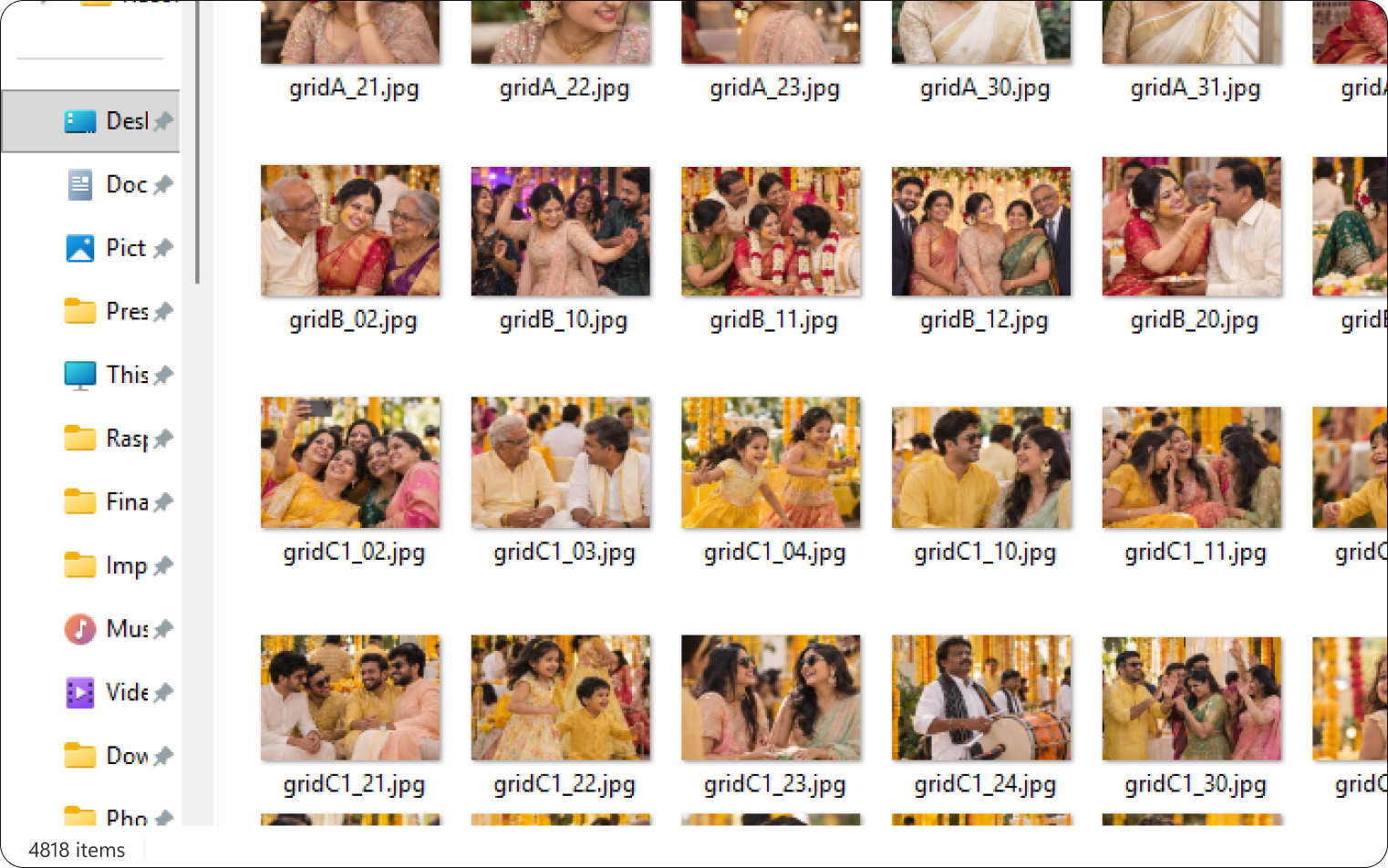
A relative's wedding ended the way most do now: with a hard drive of 4,818 photos and a request. "Can you send me all the ones with Amma in them?"
Deepak spent most of a weekend on it. Scroll, squint, drag to a folder. Somewhere around photo 1,800 the question changed from "where is she" to "why is this still a human job". Phones can already group faces. Nothing does it for a folder of RAW files on a Windows PC, and nothing does it without uploading the photos somewhere.
He wrote a script that could match a face. It worked, and it was unusable: a terminal, a config file, a number you had to guess. That's where I came in. The question I wanted to answer first wasn't how to make the script pretty. It was: who else has this weekend, and what does "done" look like for them?
2Who actually has this problem
I talked to two kinds of people, and they turned out to want almost opposite things.
Families
Photos are scattered: old phones, a backup drive, WhatsApp downloads, the wedding dump. The goal is a single folder of one person, often for a birthday slideshow or a memorial. Copies are the point. Accuracy matters, but a few misses are forgivable; a stranger in Grandma's folder is not.
Photographers
A wedding photographer friend handles hundreds of gigabytes per client, shoots in RAW, culls and edits in Lightroom Classic, and pays for cloud delivery platforms where guests find themselves by selfie. His first reaction to the script was a flat no: "A tool that makes copies of my photos would kill my storage." Then a more interesting one: he still needed to find every photo of the bride's mother across 8,000 frames for an album, and he did that by scrolling.
"Something like this would not make sense to me if it duplicates even one RAW file."
The market
Every Indian competitor we found (Kwikpic, FotoOwl, Premagic, Memzo, TurtlePic) lives at the delivery layer: upload everything to the cloud, let guests search their own faces, pay per photo or per gigabyte. Nobody worked locally, nobody touched RAW, nobody integrated with Lightroom, and all of them sold subscriptions. The desktop, pre-upload step was empty.
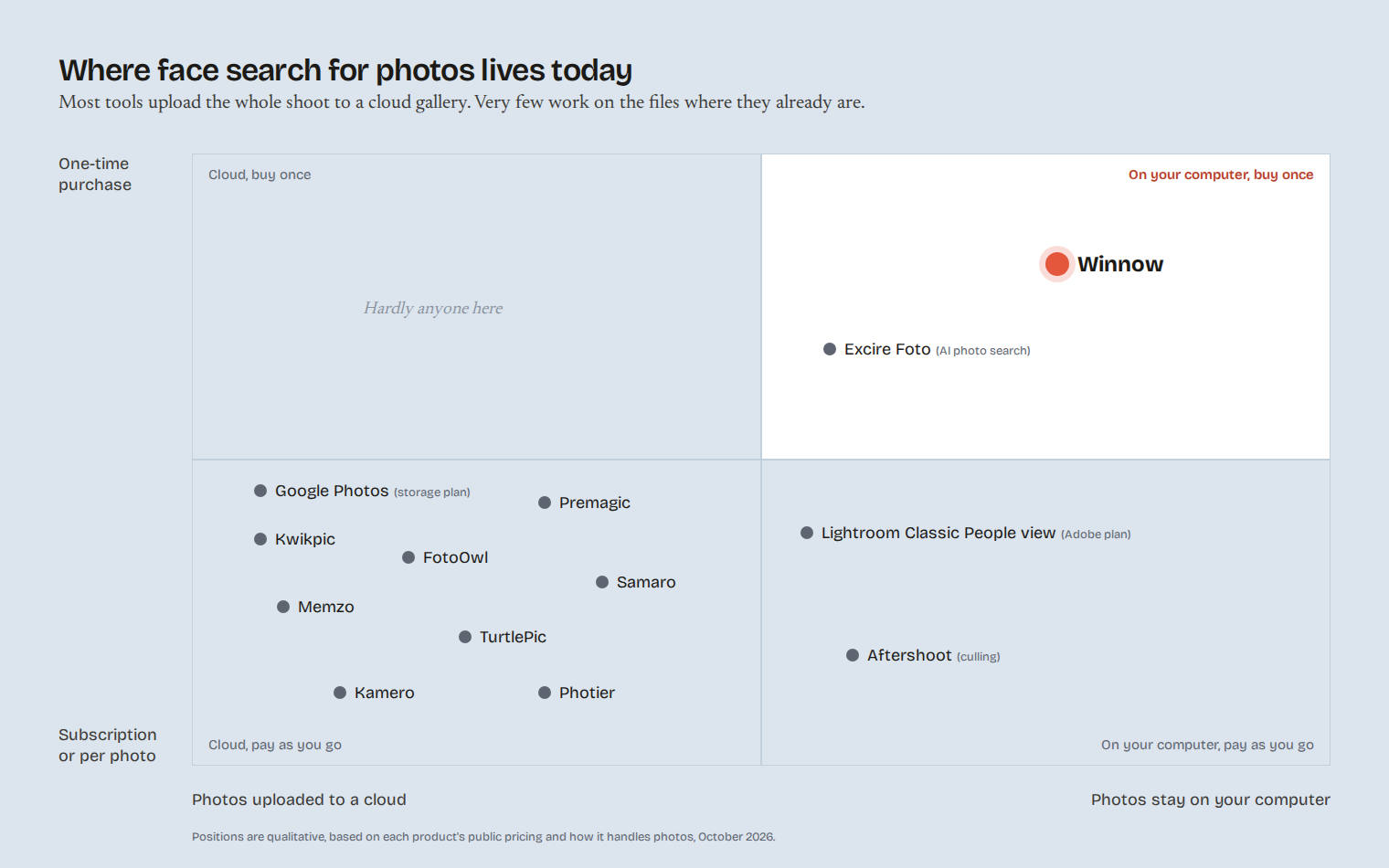
I stopped thinking about one user and one output. Families wanted copies. Photographers wanted knowledge without copies: which files contain whom, written where their tools could read it.
3One engine, two jobs
The same face-matching engine could serve both people. The interface could not.
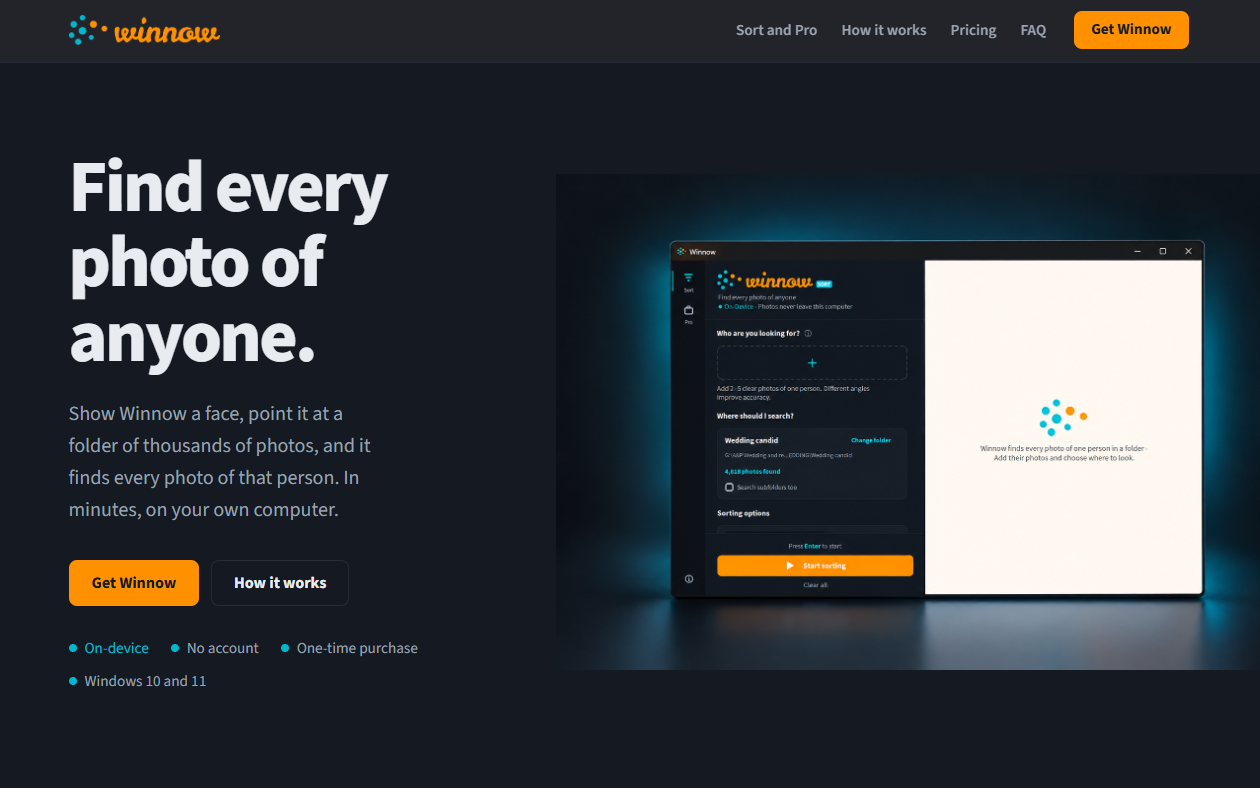
Putting photographer options into the family flow would have made it feel like software; hiding them would have made it useless to photographers. So the app got two modes behind a thin rail: Sort, which copies or moves every photo of one person into a folder, and Pro, which names several people at once and writes their names into the keyword sidecar files Lightroom already reads, copying nothing.
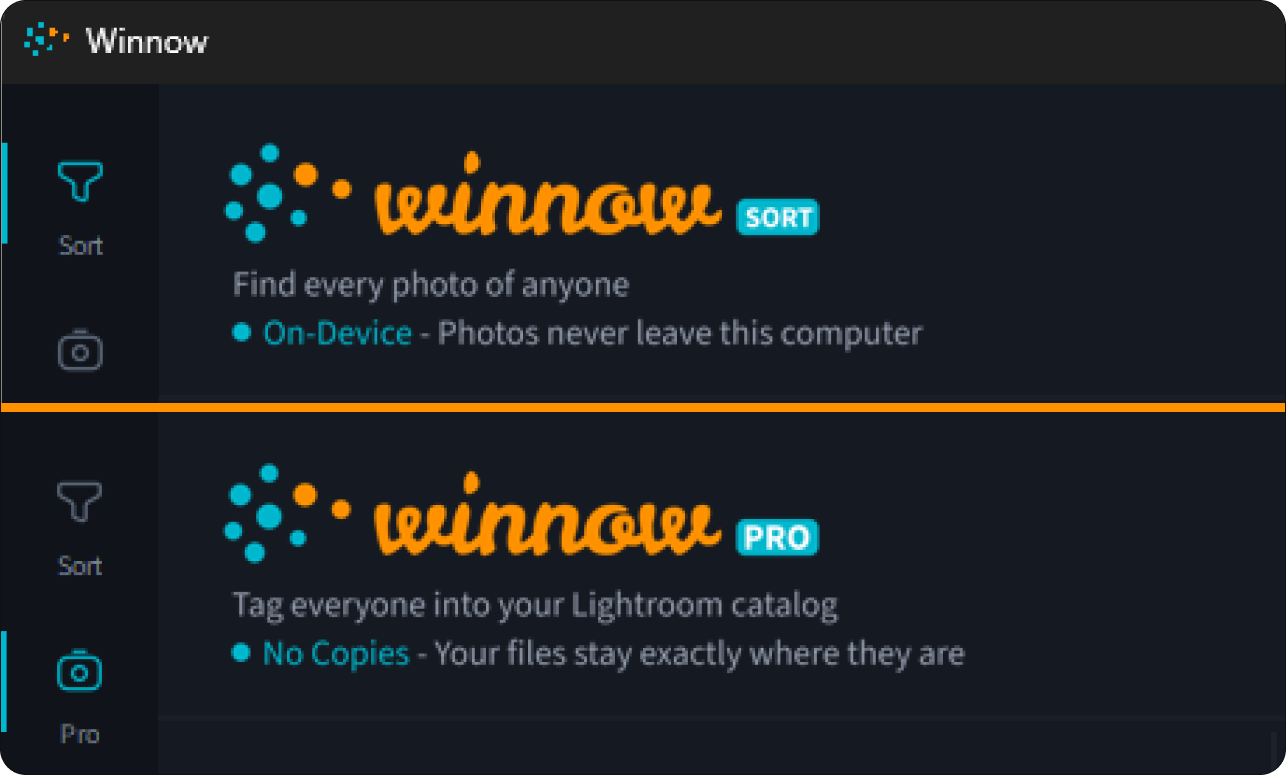
Keeping the two modes visually identical in structure (header, scrolling middle, pinned action area, results on the right) was a deliberate constraint. Switching should feel like the same brand making a different promise, not two apps.
4What the app had to promise
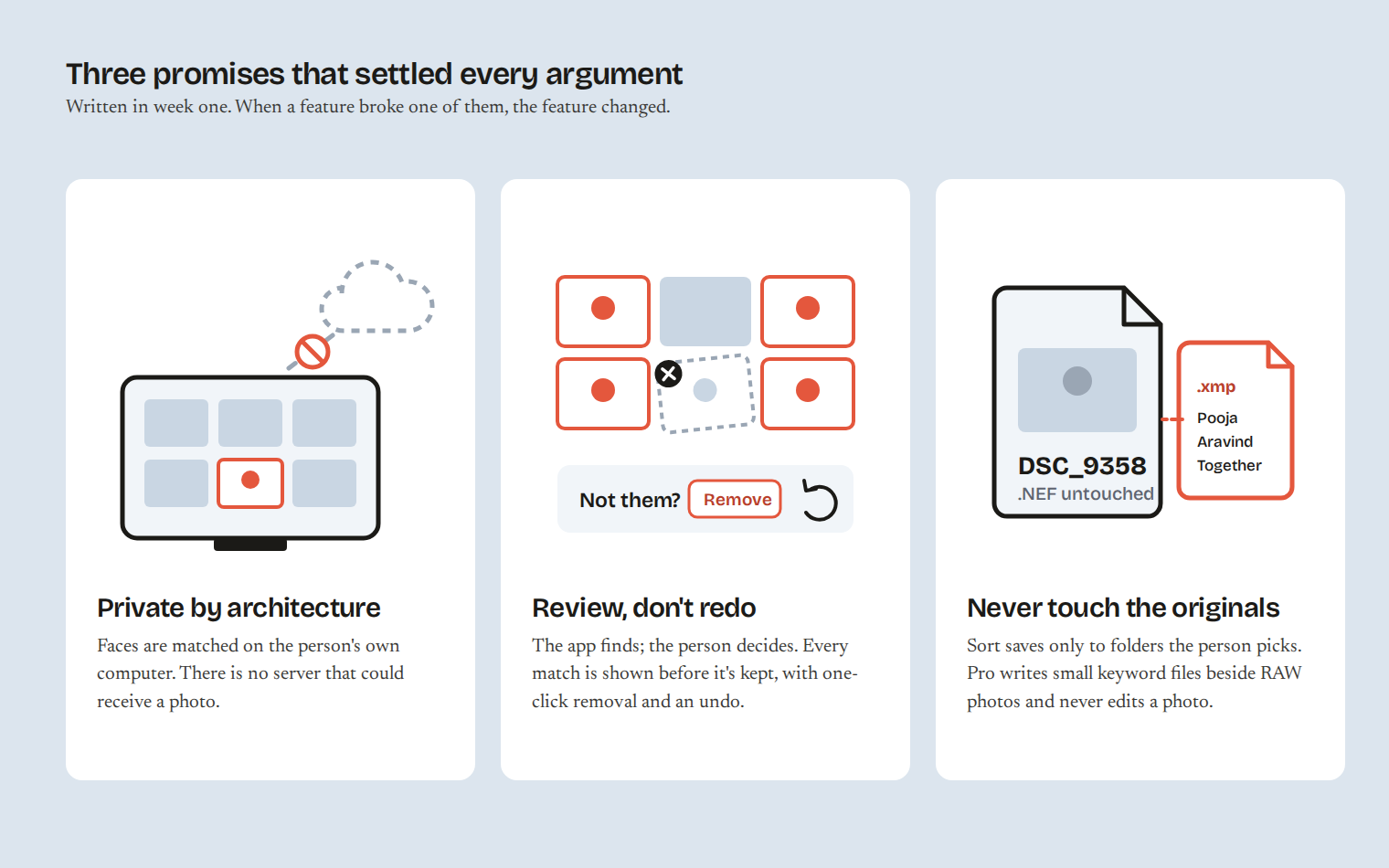
Three principles, written early and used to settle arguments later.
- Private by architecture. Faces are matched on the user's own processor. There is no server that could receive a photo. Every screen that could raise the question answers it.
- Review, don't redo. The app finds; the person decides. Every match is shown before it's kept, with a one-click way to say "not them" and an undo.
- Never touch the originals. Sort writes only to folders the user chooses. Pro writes small sidecar files beside RAW photos and never edits the photos themselves.
5Designing Sort
Sort had to be learnable by someone who has never installed a utility. Three questions, in order: who, where, how strict.
Who are you looking for?
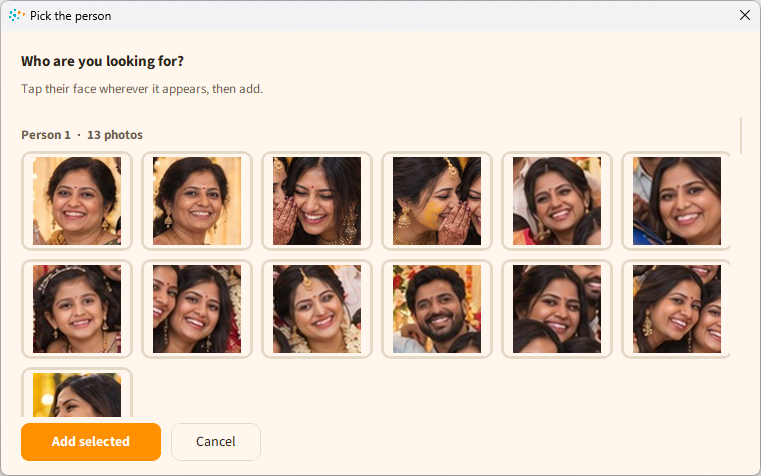
The first version asked for clear solo photos of the person. Real folders don't have those; they have group shots. So the add flow accepts a group photo, finds every face in it, clusters them by person, and asks you to tap the one you mean. The faces become round reference thumbnails you can hover to remove.
How strict should it be?
The engine produces a similarity number. Nobody should have to understand it. The slider got plain-language ends, "More matches" and "Fewer, surer matches", and a hint that changes as you drag: Loose, expect some wrong matches to review; Balanced, recommended for most photo sets; Strict, may miss photos with poor lighting or angles. The hint tells you the cost of each setting instead of its value.
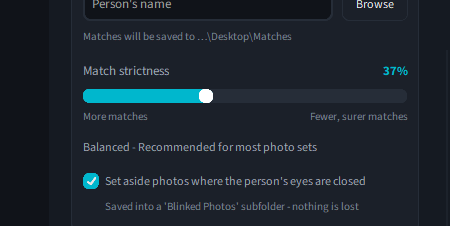
Closed eyes
Family users hated finding blinked photos in the final folder but were nervous about anything being thrown away. The answer: photos where the person's eyes are closed are saved into a 'Blinked Photos' subfolder. The checkbox says so: Saved into a 'Blinked Photos' subfolder, nothing is lost.
Reviewing matches
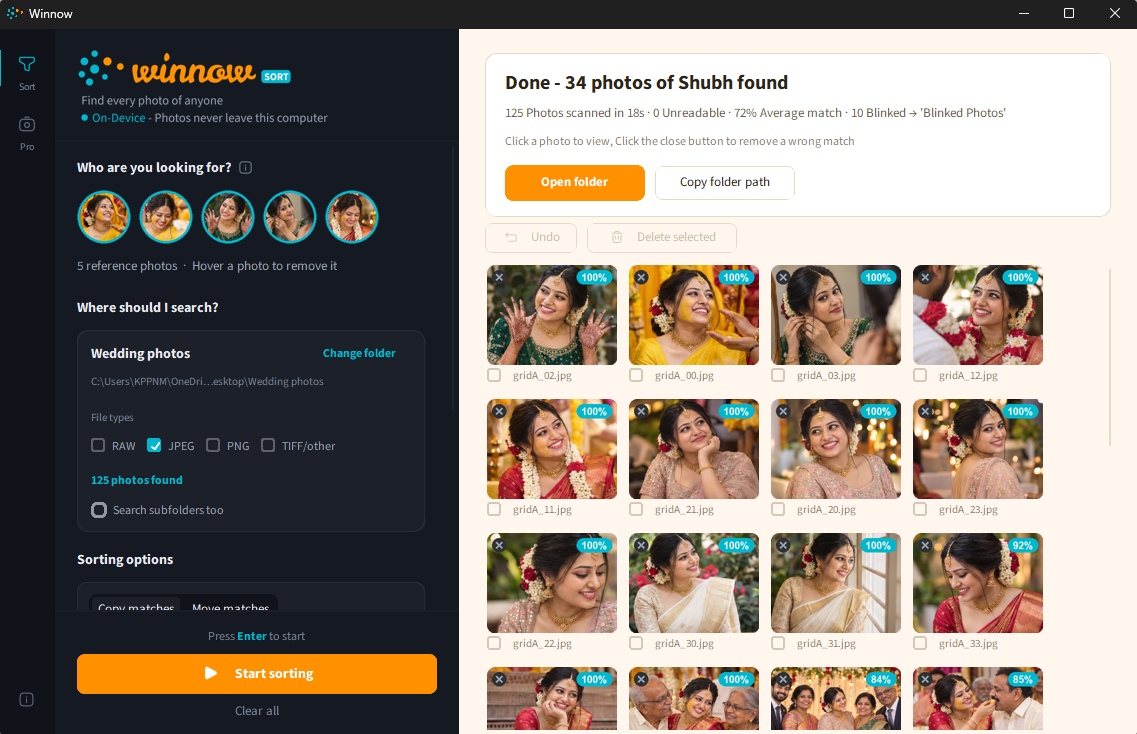
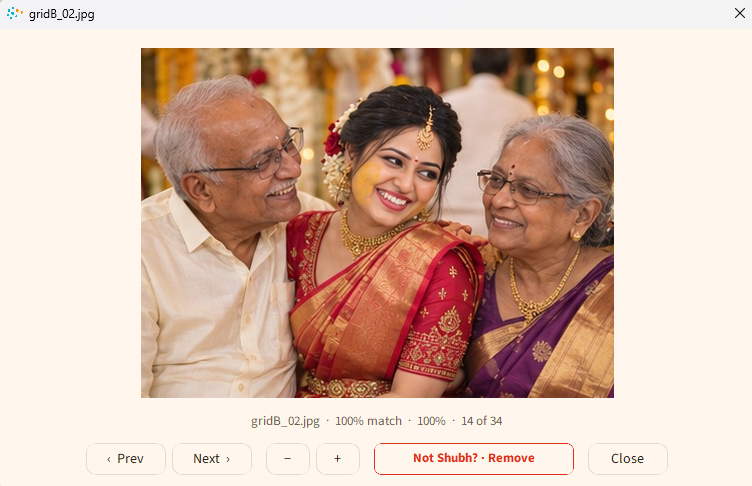
Results stream in as tiles while the scan runs, each with its match percentage and a small remove circle in the corner. A wrong match is one click and a confirmation; undo brings it back. Clicking a tile opens a viewer with next and previous, zoom, and the same "Not them? Remove" action, so review can happen at full size.
6Designing Pro
Pro's job was to earn a seat in a workflow that already works: cull, edit in Lightroom, deliver. It could not add copies, and it could not ask photographers to live in a new app.
Writing to Lightroom without touching Lightroom
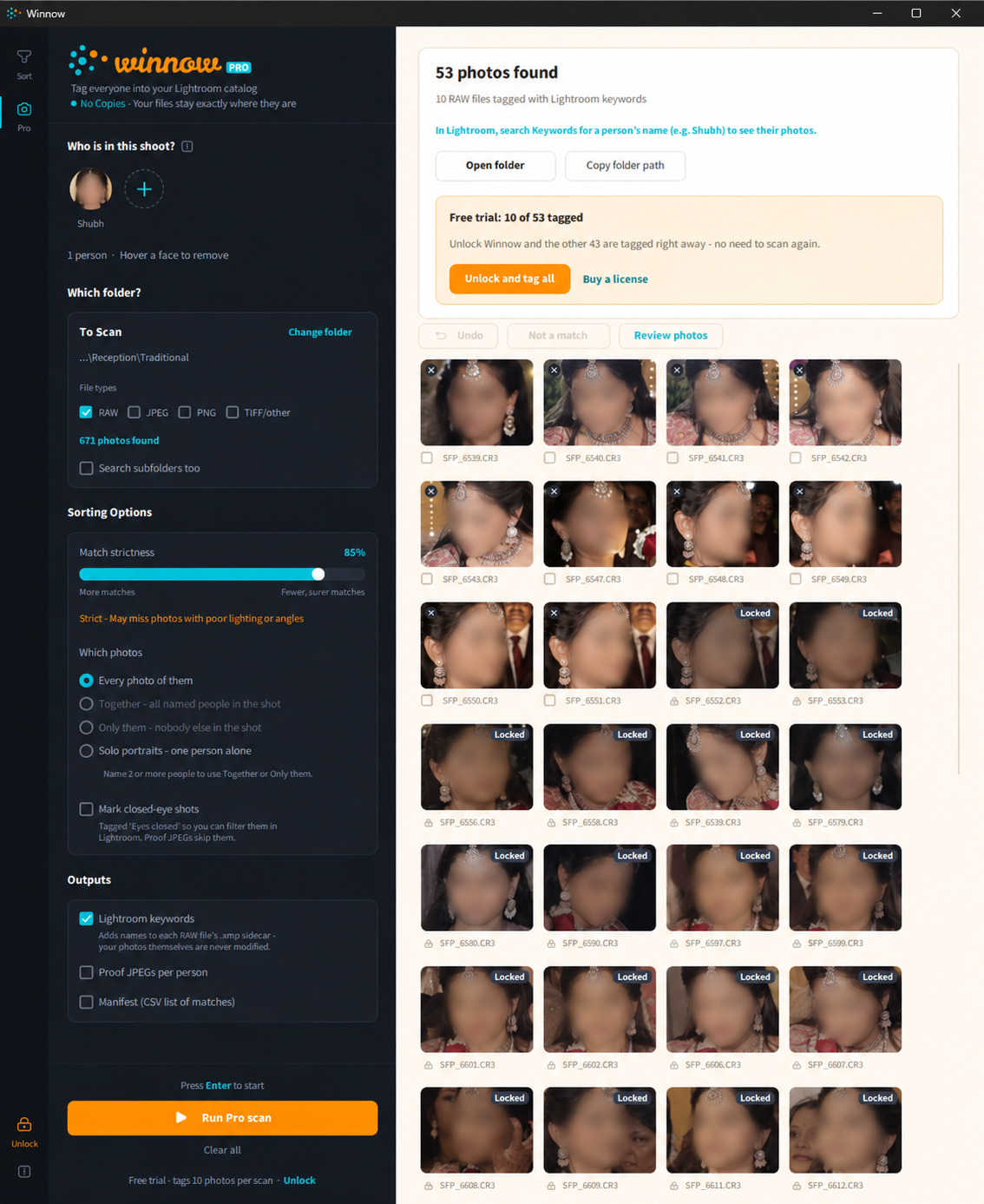
Lightroom Classic reads small .xmp sidecar files next to RAW photos. Pro writes hierarchical keywords into them: Winnow | People | Pooja. The photographer searches Keywords for a name and sees every photo of her. Nothing was copied, nothing was uploaded, and their own keywords and edits are untouched because the sidecars are merged, never replaced.

The checkbox problem
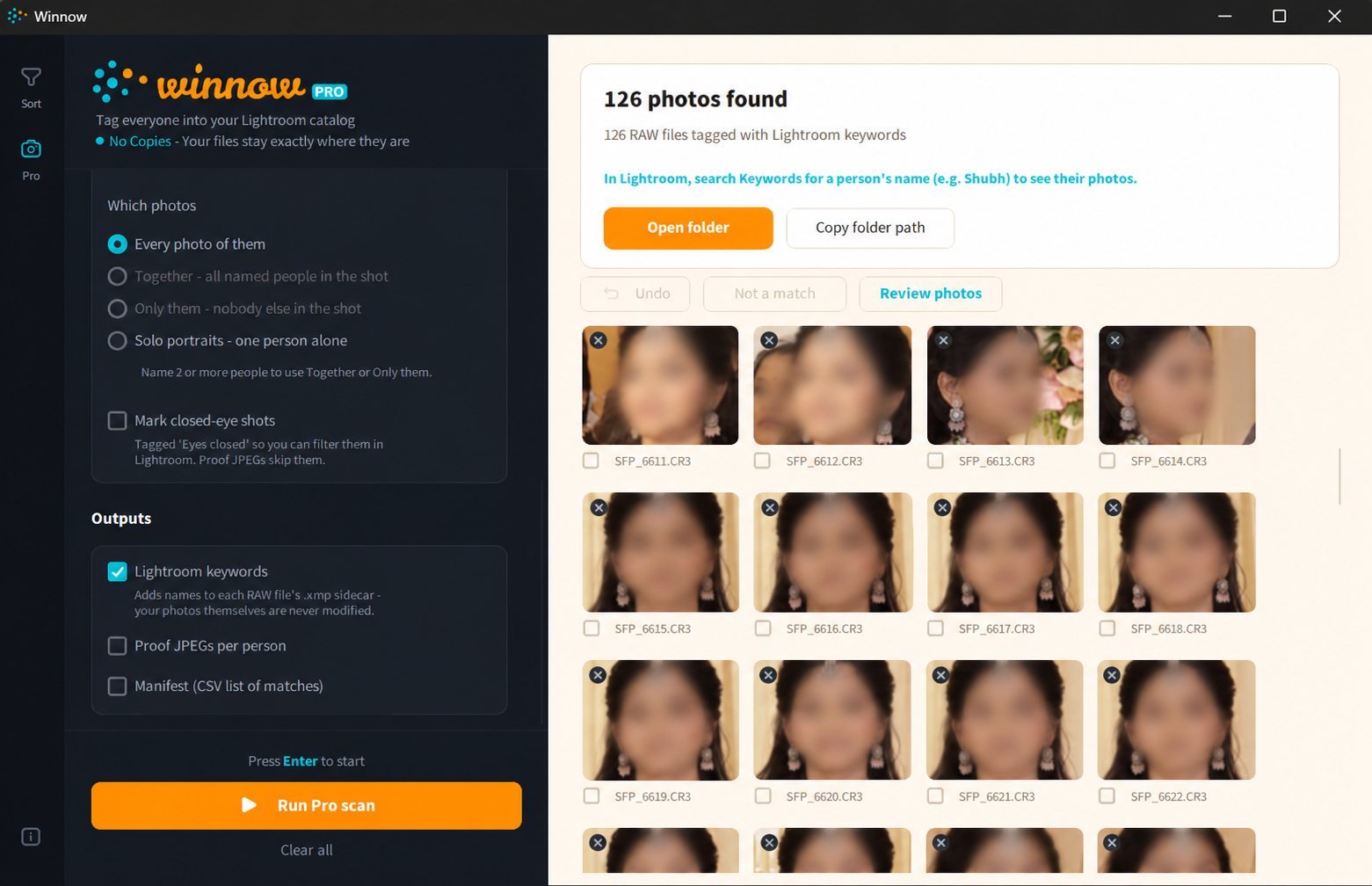
The first Pro design offered three filters as checkboxes: Only photos with everyone named, Include solo photos, Skip photos with other people. In testing, the combinations contradicted each other. With two people named, "everyone" means at least two faces, so "solo" can never apply. With one person named, "everyone" does nothing. The skip counts in the summary depended on which rule happened to be checked first.
Photographers don't think in rule combinations. They think in shot types. So the three checkboxes became one question, Which photos?, with four answers: Every photo of them, Together, Only them, Solo portraits. Together and Only them grey out until two people are named, with a hint saying why.
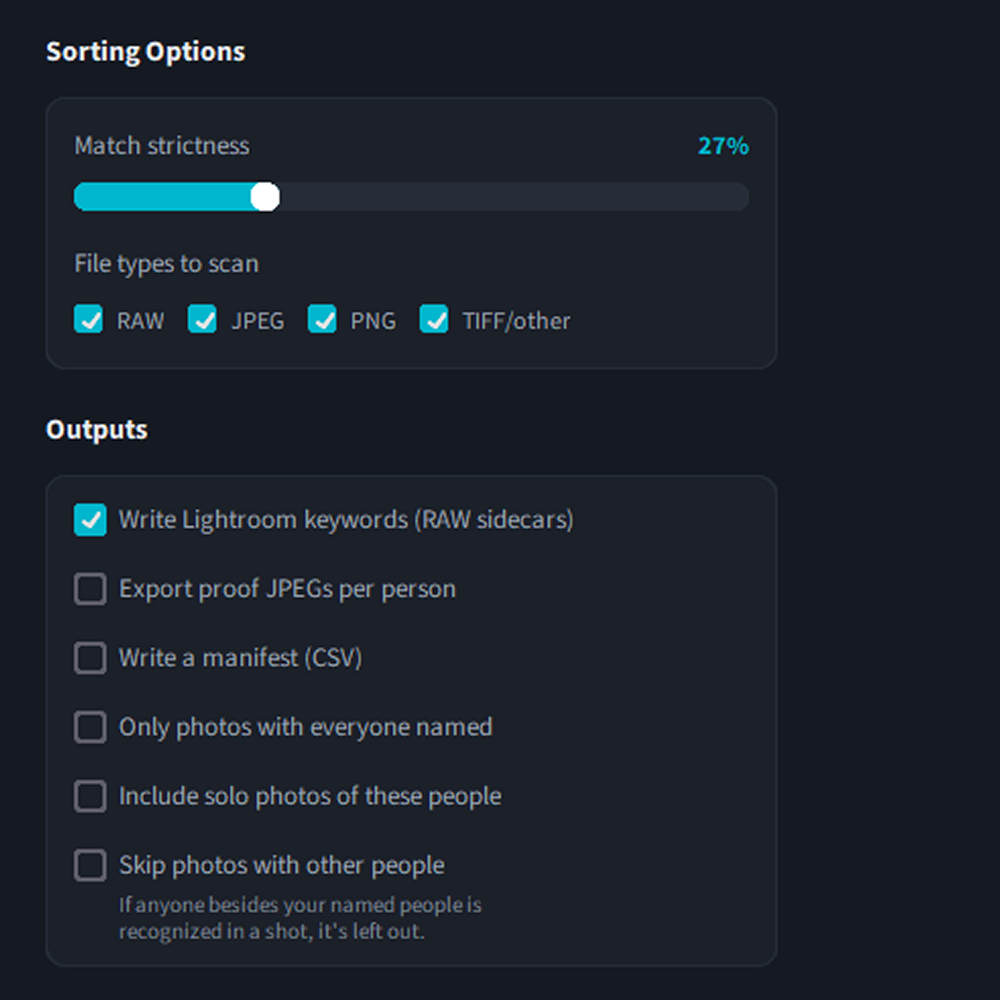
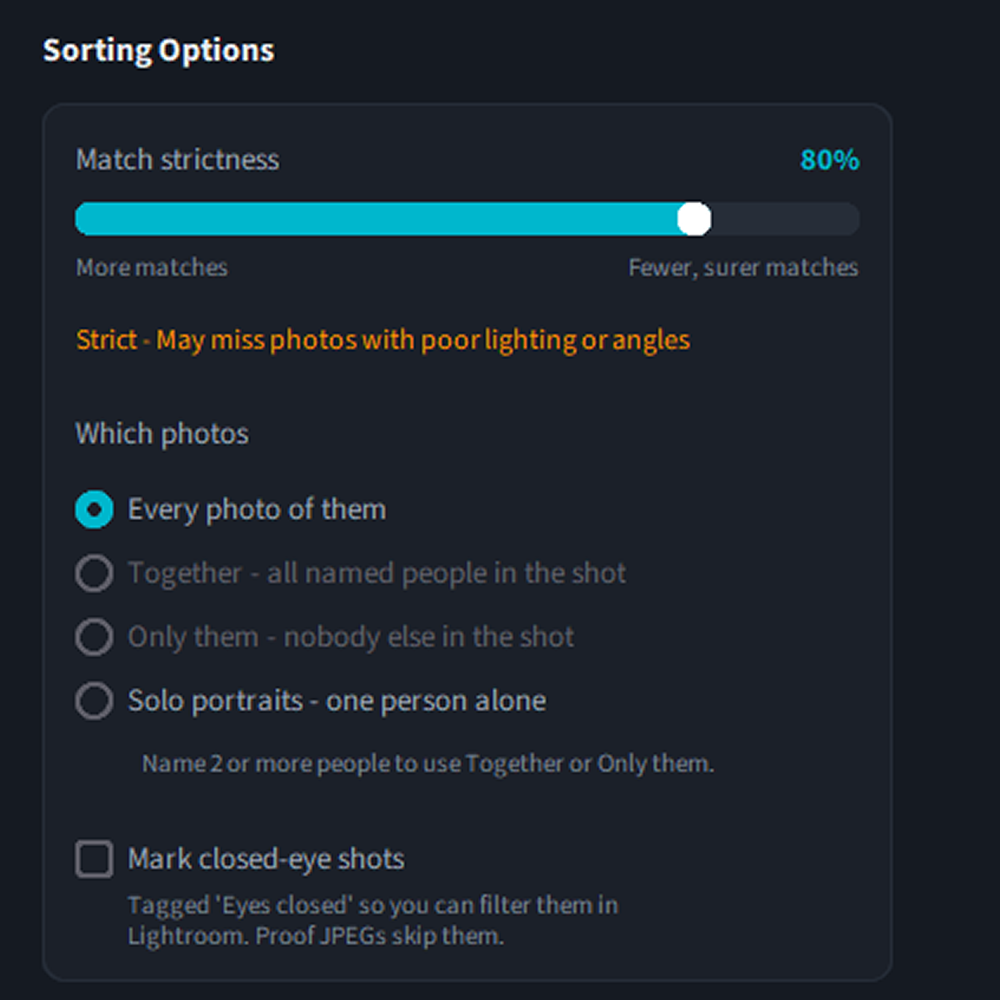
Replace composable rules with named outcomes. It removed six impossible states and one misleading counter, and it made the summary line honest: "2,247 photos didn't fit 'Only them'".
Words that scared people
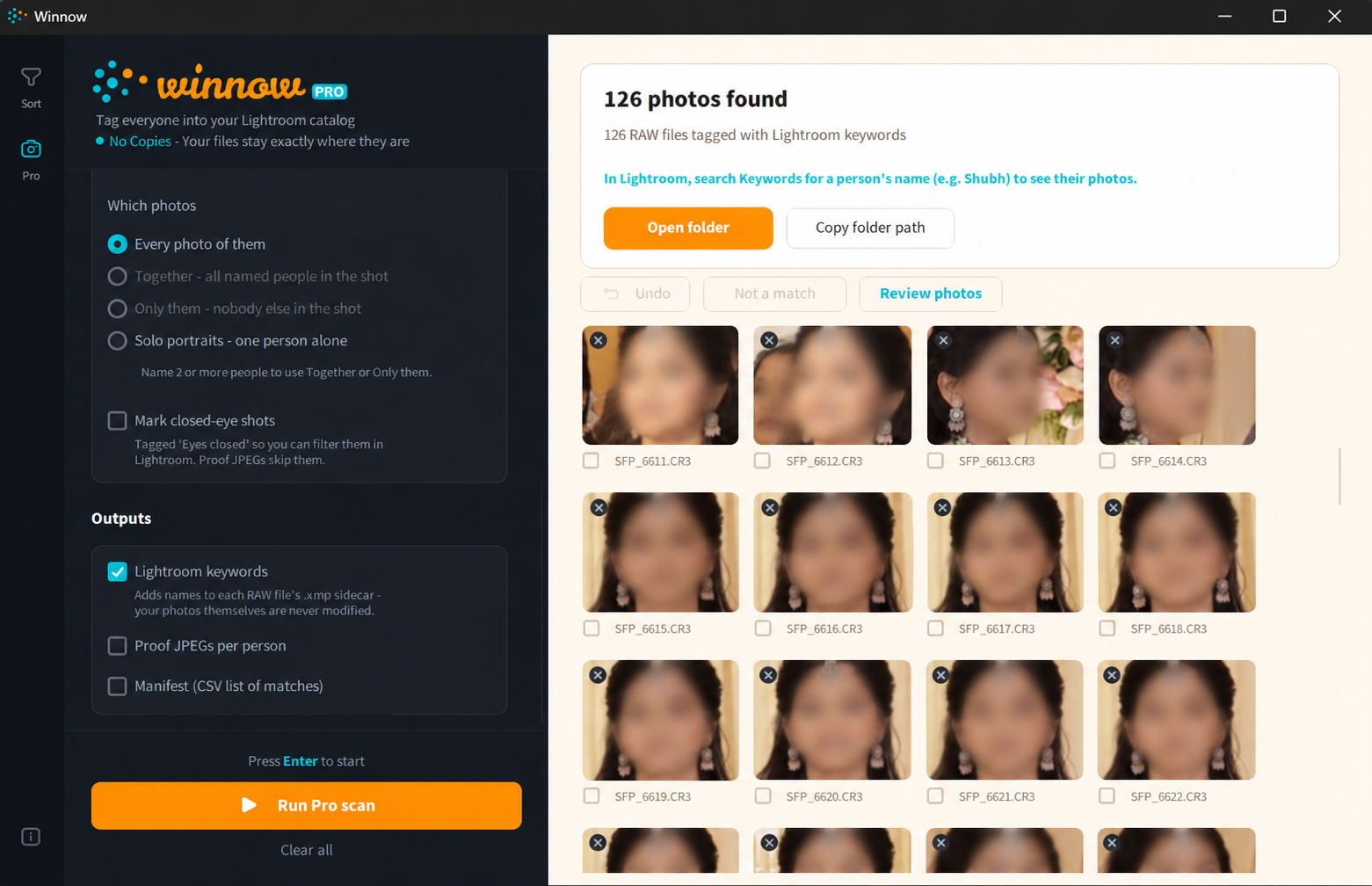
The review toolbar said Delete selected. To a photographer that reads as deleting photo files. It became Not a match, which is what it does. View proofs became Review photos, because by default no proof files exist. Small changes; the kind that decide whether someone trusts the app with 300 GB.
Human in the loop
Pro's results show one tile per photo with the matched faces cropped side by side, a checkbox, and the remove circle. Removing a photo strips its Winnow keywords from the sidecar and parks its proof file; undo restores both exactly. A viewer window with a scrolling rail of tiles lets you check matches at full size.
7Making it feel trustworthy
The identity had one job: make "your photos never leave this computer" feel true before anyone reads it.
The mark is a loose cluster of muted dots with a few cyan and orange ones separating out, which is what winnowing means. The app is split-tone: a dark rail for controls, a warm cream surface for the photos, so the user's images always sit on the light side. Orange is reserved for the one action that matters on a screen; cyan marks highlights and links; red appears only for destructive actions. Source Sans 3 throughout.

The copy was treated as part of the design. Every button says what happens when you press it. Every empty state says what to do next. The privacy policy was written in plain language first and translated into legal structure second, and it says the thing most policies won't: we could not view your photos even if we wanted to.
8Testing on real weddings
We tested on real wedding folders: a 218-photo set we knew the answers for, a 2,409-photo candid folder, and the original 4,818-file dump.
The 20% week
Early Pro scans found 20% of the photos Sort found with the same references, and the exclusivity filter both dropped real matches and let strangers through. It would have been easy to blame the model. It wasn't the model. Pro rotated images before detection using the camera's orientation tag, and RAW previews were already upright, so the detector was being handed sideways faces. Finding this took the two of us a day of side-by-side scans. The fix was to give both modes one shared way of loading images.
A second rotation bug hid in plain sight for weeks: portrait JPEGs appeared sideways in tiles and proofs, because the image library already honours the orientation tag and the app rotated them a second time. Both bugs changed how I test now: every visual check includes a portrait photo and a RAW file.
What photographers noticed first
- Too many orange buttons: Open folder, Unlock, and fifty orange match badges competed. Now one action per card is orange and match badges are cyan.
- A dialog that didn't grow when an error appeared, hiding its buttons at 150% display scaling.
- File types: shoots contain a JPEG next to every RAW. A file-type row went inside the folder card, above the photo count, so the count updates as you tick formats.
9Shipping it
A free trial that shows everything and saves a little, a one-time license, and a Store listing. Each needed design.
A trial that doesn't hide the result
The free version runs every scan completely and shows every match. It saves 10 of them (and 3 closed-eye photos) in Sort, and tags 10 photos in Pro. The rest stay visible in place, dimmed with a Locked badge, so the person sees exactly what they'd get. The results card says "Free trial: 10 of 53 saved" and offers Unlock and save all: after a key is entered, the held-back photos are saved from the scan that just ran. Nobody scans twice.
Unlocking
One field, a paste button inside it (keys arrive by email and bring stray spaces with them), and errors that say what to do: This key is already active on 3 computers. On one you no longer use, open Help & About and choose Remove this computer. Being offline never locks anyone out; only a clear "invalid" from the payment provider does.
Launch
- Week 1 to 2Research, two-mode reframe, Sort flows and visual identity
- Week 3 to 4Pro mode, Lightroom integration, the checkbox-to-radio redesign
- Week 5Field testing on real weddings, the rotation bugs, trial and licensing design
- Week 6Website, payments, Store packaging, certification and submission

10What I learned
- The first user you meet can redefine the product. One photographer saying "no copies" turned a sorting tool into a tagging tool for half its audience.
- Name outcomes, not rules. Options that compose logically still fail if people don't think in those combinations.
- Words are interface. "Delete selected" and "Not a match" do the same thing. Only one of them is safe to click without reading twice.
- Test with the ugly files. Portrait JPEGs and RAW previews found bugs that a thousand landscape JPEGs never would.
- Design the trial as carefully as the product. Showing everything and saving some respected the person's time and still made the license worth buying.
What's next
A duplicate and burst-culling mode is the strongest candidate: photographers' biggest pain is storage, and a mode that finds near-identical frames and keeps the sharpest attacks it directly. After that, best-shot selection using the eyes-open and sharpness signals the app already computes.